
Who this FastGPT guide helps
This page is for builders searching for FastGPT deployment, localized AI agent setup, and fast knowledge-base implementation. It focuses on getting from setup to usable workflow quickly.
MANUAL INQUIRY
Need ClaudeCode or GPT recharge help?
Use the inquiry pages for ClaudeCode, GPT recharge, assisted purchase, and team sourcing.
Automatic payment is not configured. Pricing, region support, and timing are confirmed manually.
AI Agent Local Deployment (FastGPT): Master It in 5 Minutes!
"In this tutorial, we will use Sealos for a rapid one‑click deployment of FastGPT. No server or domain configuration is required, allowing you to easily achieve high concurrency and dynamic scaling. This tutorial will detail the deployment architecture, configuration parameters, and how to access the FastGPT service."
"Quick Links"
- Official Website Home Page
- GitHub Project URL
- Join the WeChat group
"One-Click Deployment FastGPT"
Deployment Architecture Diagram
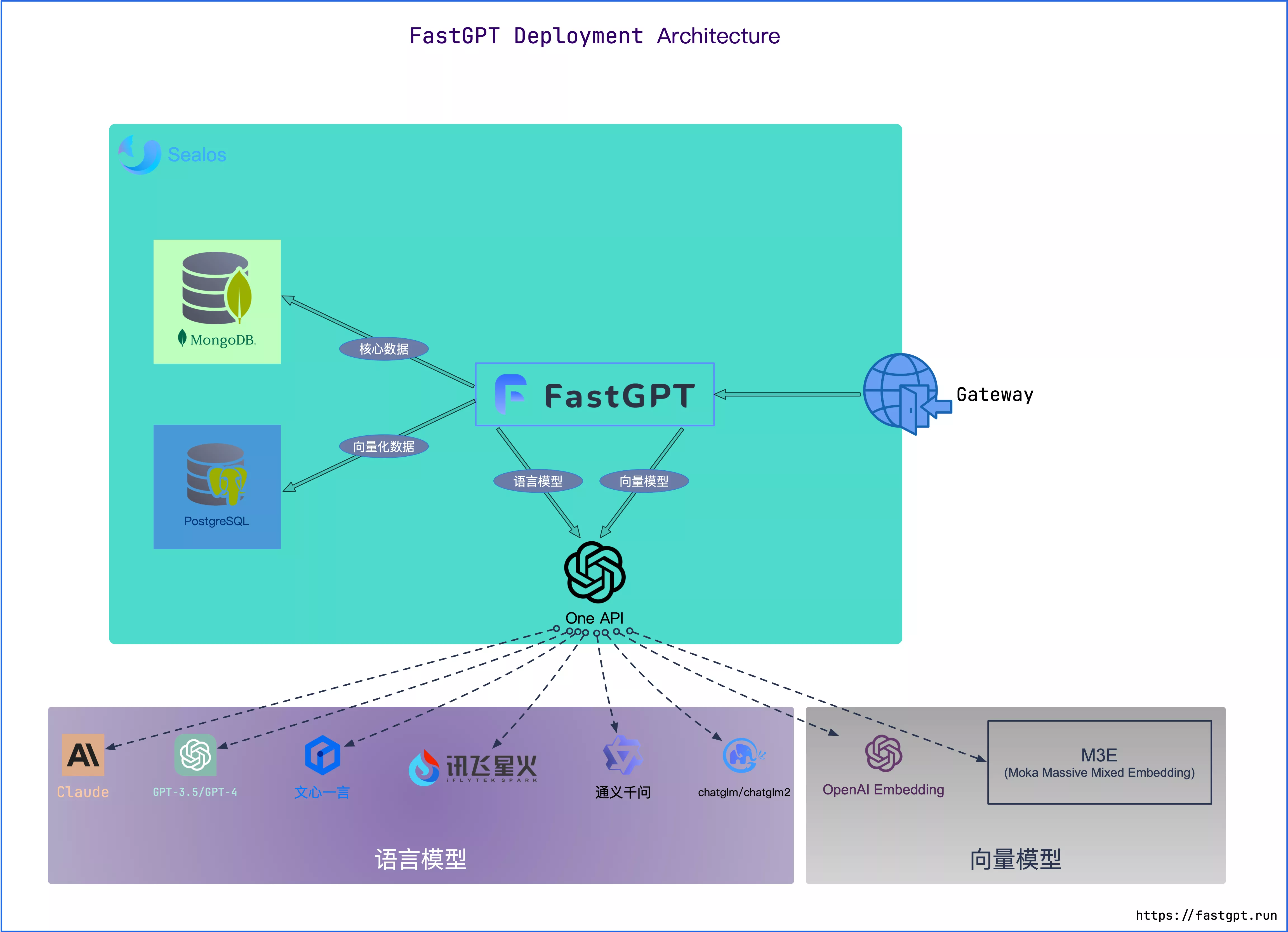
"Using Sealos to deploy FastGPT, the architecture is illustrated in the figure below:"
"Multi-Model Support"
FastGPT leverages the one‑api project to manage its model pool, ensuring compatibility with OpenAI, Azure, leading domestic models, and local models, thereby offering users a diverse selection of models.
- Reference: Sealos Quick Deployment of OneAPI
"One-Click Deployment of Sealos Service"
Sealos offers two deployment options—the Singapore region and the Beijing region—allowing users to select the one that best fits their needs.
Singapore Region
- Advantages: Direct access to OpenAI
- Cons: Domestic users need a VPN, and the price is slightly higher.
- Deployment:

Beijing District
- Advantages: Volcano Cloud provides stable domestic access
- Drawbacks: Unable to access OpenAI services, priced at one‑quarter of the Singapore region.
- Deployment:

Commencing Deployment
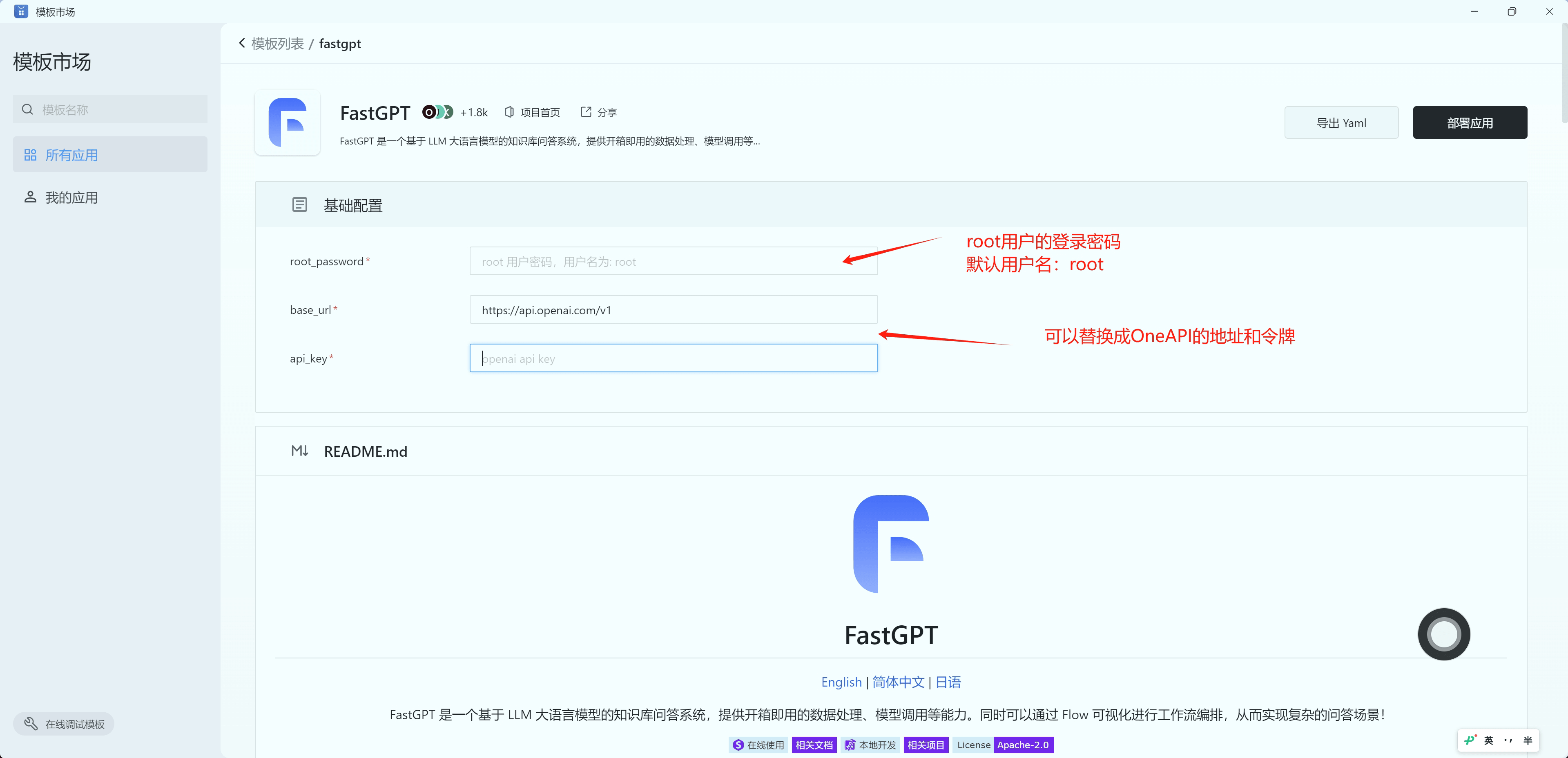
After deployment is complete, you need to wait 2–4 minutes for the database to initialize, as the first access may be slower. Follow the prompts to enter the root_password as well as the address and key information for openai/oneapi to finish the basic configuration.
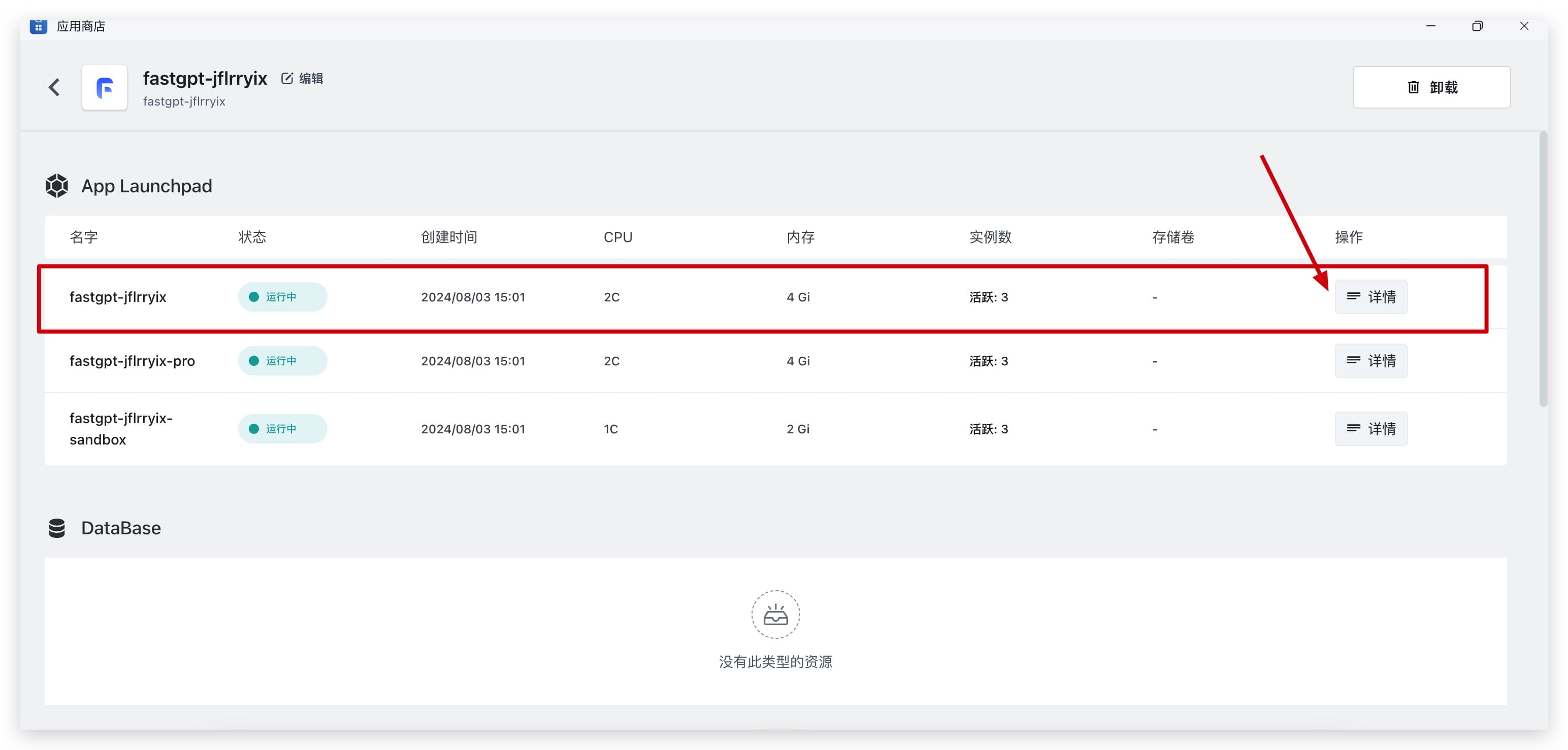
After clicking Deploy, you will be redirected to the Application Management page; select the fastgpt primary application, and you can access it by reviewing its details.
"Access the FastGPT Service"
"On the deployment management page, click the external access URL link to instantly launch the FastGPT service."
如需绑定自定义域名或修改部署参数,请点击右上角变更,按照 Sealos 的指引完成相关配置。
Access and Management
Login
- Username: root
- Password: The root_password you set during one‑click deployment
Modify Configuration Files and Environment Variables
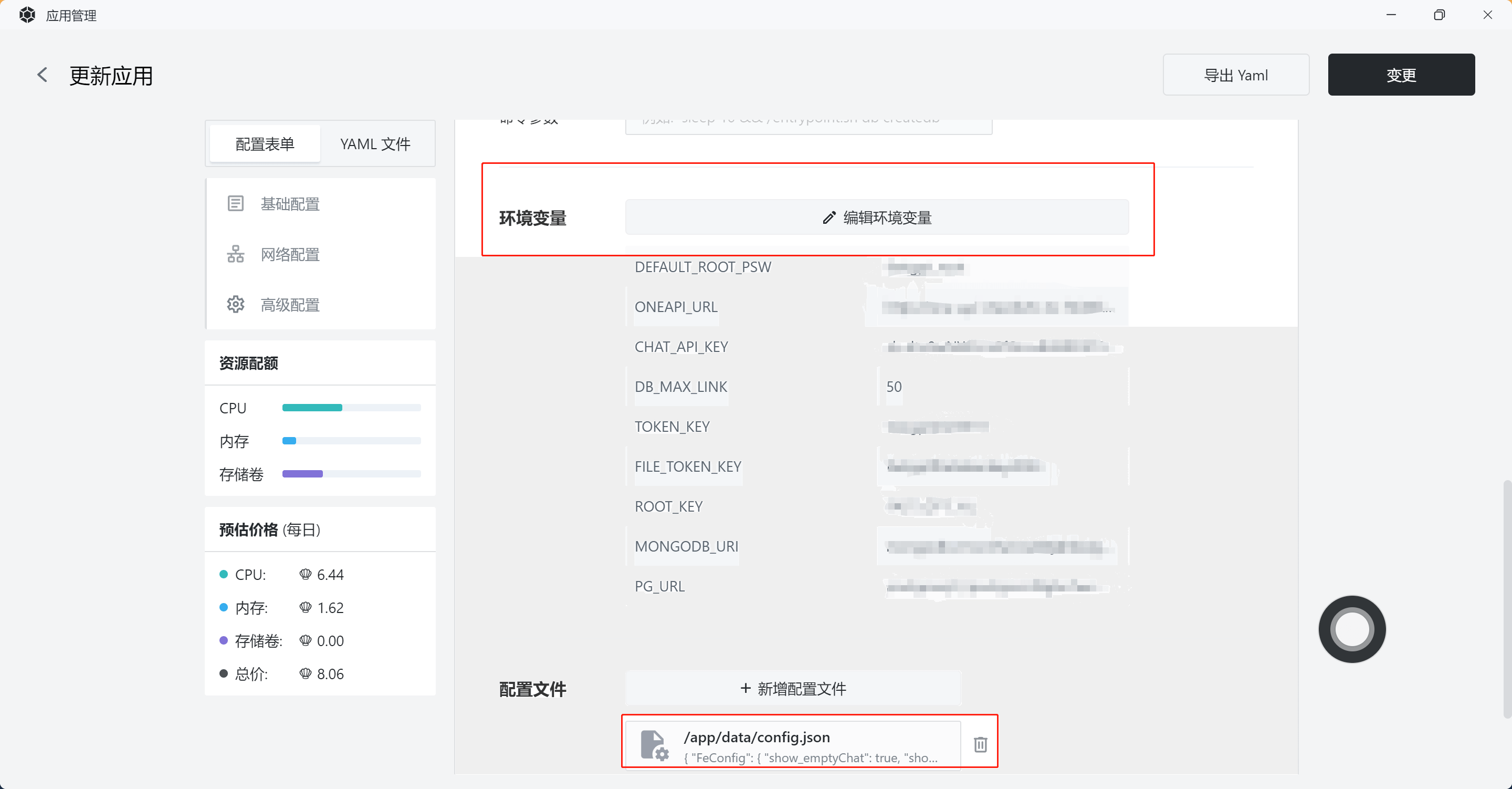
In Sealos, open Application Management to view FastGPT’s configuration files and database information.
In Application Management, select FastGPT, click Change, and view and edit environment variables and configuration files.
Updating the FastGPT Service
Update/Upgrade Steps:
- Open the upgrade document, select the appropriate version, and avoid cross‑version upgrades.
- In the Sealos application management interface, locate FastGPT, click the Change button in the upper‑right corner, and update the image version number.
- After updating the image version, click Change/Restart to automatically pull the latest image update.
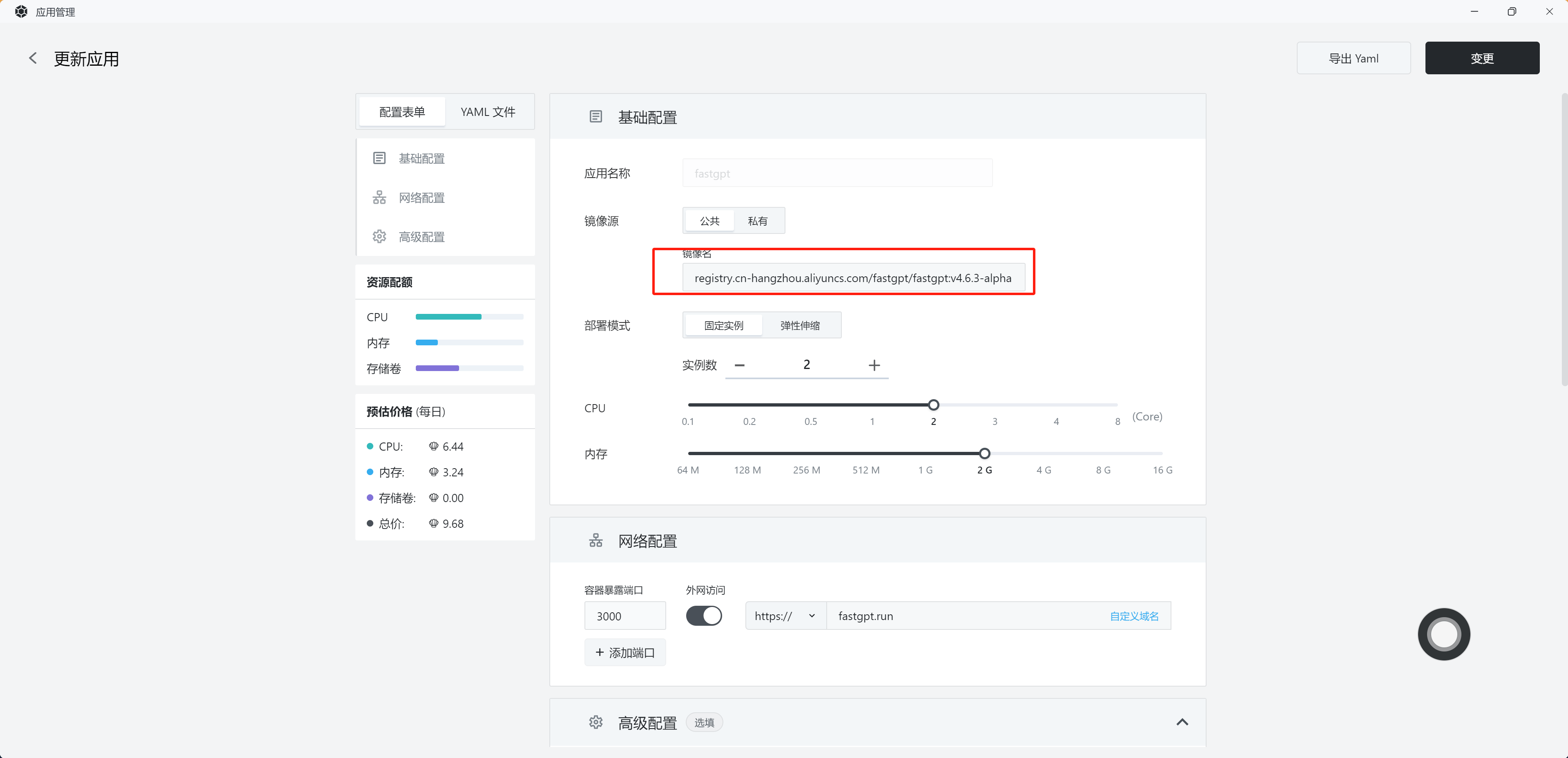
Custom FastGPT Configuration
Custom Domain
In the application management interface, select Change → Custom Domain, enter the domain name, and configure the CNAME.
Updating the Site Name and Favicon
"You can adjust the site name, description, favicon, and other settings through environment variables."
Advanced Features and Operations
Configure Logo
Currently supports logo replacement in SVG format. In Application Management, a new mounted file `/app/projects/app/public/icon/logo.svg` has been added.
Run and Pause
On Sealos, FastGPT comprises one service and two database instances. You can manually control the start and pause of the service and databases in the Application Management section, enabling flexible resource management at different times.
"Commercial Edition Management Backend"
FastGPT Business Edition offers an enhanced admin dashboard, allowing you to manage projects within Plus.
The commercial edition includes two applications (fastgpt, fastgpt-plus) and two databases, and also supports multiple API keys, making it ideal for complex business requirements.
"Image Configuration File"
"You can customize settings in the Sealos configuration file:"
Frequently Asked Questions & Support
- Pay-as-you-go: Sealos charges based on CPU, memory, and disk resources, and you can view the detailed costs in the Cost Center.
Through this tutorial, you can now swiftly deploy the FastGPT service on Sealos and enjoy a high‑efficiency AI application experience! If you have any further questions, feel free to join our fan community.
MANUAL INQUIRY
Need ClaudeCode or GPT recharge help?
Use the inquiry pages for ClaudeCode, GPT recharge, assisted purchase, and team sourcing.
Automatic payment is not configured. Pricing, region support, and timing are confirmed manually.