
Who this OmniParser page helps
This page is for builders searching for OmniParser, UI parsing, screen understanding, and how structured interface extraction can improve automation tools and AI assistants.
MANUAL INQUIRY
Need ClaudeCode or GPT recharge help?
Use the inquiry pages for ClaudeCode, GPT recharge, assisted purchase, and team sourcing.
Automatic payment is not configured. Pricing, region support, and timing are confirmed manually.
Microsoft OmniParser Open-Source UI Parser: Automation Powerhouse That Outperforms GPT-4V!
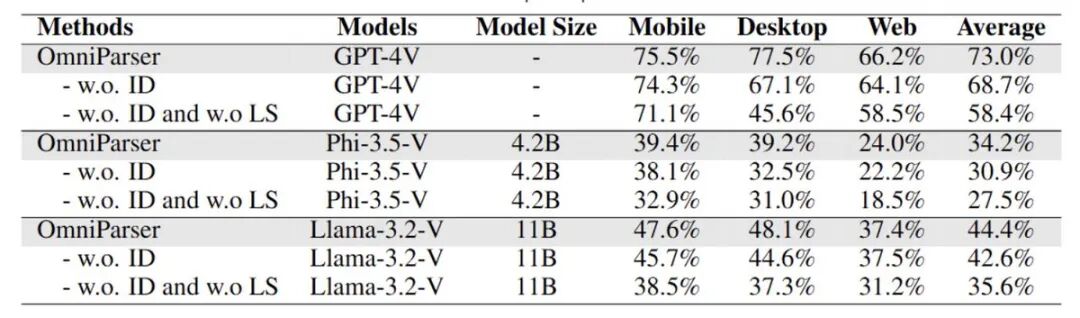
Microsoft has officially released OmniParser, an open-source UI parser that demonstrates exceptional performance in screen parsing and understanding, even surpassing GPT-4V in benchmarks! This tool can parse UI screenshots into structured formats, dramatically enhancing screen comprehension capabilities for automation tools and AI assistants.
What is OmniParser? How Does It Work?
OmniParser is a universal screen parsing tool specifically designed to transform user interface (UI) screenshots into structured data. This means machines can "understand" on-screen elements, such as identifying clickable areas, icon functions, and more. For developing automation tools, AI assistants, and intelligent applications, OmniParser is an indispensable technical foundation.
OmniParser open-source repository: huggingface.co/microsoft/OmniParser
OmniParser's advantages lie not only in its parsing capabilities but also in its open-source nature and MIT license, allowing developers to freely use, modify, and redistribute it. This flexibility makes it a major win for both developers and researchers.

OmniParser's Technical Highlights
OmniParser is built on two carefully designed datasets:
- Interactive Icon Detection Dataset: Annotates clickable and actionable areas across popular web pages.
- Icon Description Dataset: Links UI elements with their functions, providing precise functionality recognition.
OmniParser's model architecture combines YOLOv8 and BLIP-2 models, with the former handling icon localization and the latter managing functional descriptions. Their collaborative work forms OmniParser's powerful parsing capabilities, enabling it to surpass other open-source models like GroundingDINO.
Recommended Parameter Configuration
- LoRA Weight: 0.8-1.3
- Steps: 20
- CFG Value: 3.5
- Output Image Resolution: 896 x 1280
OmniParser's Real-World Application Scenarios
In screen understanding and web navigation benchmarks (such as Mind2Web), OmniParser demonstrates outstanding performance. It can unlock intelligent behaviors in Robotic Process Automation (RPA), providing efficient solutions for developers, test engineers, crawler developers, and enterprise automation users.
OmniParser's applicable scenarios include:
- Enterprise Automation: OmniParser can help streamline UI interactions in business processes.
- Web automation: Even when web design changes, tools based on OmniParser can still automatically identify and parse screen elements, reducing maintenance costs for automation scripts.
- Test automation: Structured parsing of UI helps automation testing tools operate UI more intelligently.
- Smart assistant development: Provides AI assistants with UI understanding capabilities, suitable for mobile devices and desktop applications.
Comparison of OmniParser with Other Open Source Projects
OmniParser isn't Microsoft's only UI parsing project. Microsoft previously released another open source project—UFO (UI for Operations), a UI interaction agent framework for Windows operating systems that allows seamless navigation and operation across multiple applications, bringing more convenience to users' Windows experience.
UFO open source repository: github.com/microsoft/UFO
Security and AI Ethics Considerations
While OmniParser is powerful, Microsoft specifically reminds users to pay attention to security and privacy protection when releasing it:
- Responsible use: OmniParser converts unstructured screenshots into element lists, but users should be mindful of input data privacy.
- Avoid bias: OmniParser-BLIP2 may make stereotypical inferences about potential attributes of icons (such as gender, race), and users need to exercise caution.
Summary
The open-source release of OmniParser brings powerful support for UI parsing and automation. It not only delivers excellent performance but also demonstrates tremendous potential in real-world applications. OmniParser helps enterprises, automation tool developers, and AI assistants achieve more flexible screen parsing, marking a milestone in screen understanding technology.
Microsoft continues to expand the possibilities of UI automation, providing developers with a more powerful toolkit through projects like OmniParser and UFO. If you're a developer, test engineer, or AI researcher, OmniParser is definitely worth exploring and using.
Read more tech insights and tool analyses at Charliiai.com, and follow the latest developments in Microsoft OmniParser!
MANUAL INQUIRY
Need ClaudeCode or GPT recharge help?
Use the inquiry pages for ClaudeCode, GPT recharge, assisted purchase, and team sourcing.
Automatic payment is not configured. Pricing, region support, and timing are confirmed manually.